
QREDI Integration API (1.1.2)
Download OpenAPI specification:
The QREDI Integration API simplifies interoperability between clients and transportation companies. It introduces a new approach to logistics data exchange by adopting the global GS1 standard for Electronic Product Code Information Services (EPCIS 2.0).
EPICS 2.0 standard provides a unified way to track and trace physical and digital objects across your supply chain. By enabling a single, standardized interface, the QREDI API helps companies reduce future costs and complexity by avoiding the need for multiple, tailor-made integrations.
This API specification is under active development. We are continuously enhancing it to support a growing number of partners and diverse business cases. Having validated market needs with initial custom integrations, we are now transitioning to this standardized API to better serve our customers with a more scalable and interoperable solution.
The QREDI API is a RESTful service that uses standard JSON for request and response bodies and secures endpoints with OAuth 2.0 (Client Credentials grant).
All API endpoints described in this document are relative to the base URL: https://api.qredi.eu/v1/.
Its core capabilities allow you to:
- Register Transport Units: Create new logistics records using GS1 identifiers.
- Modify Transport Unit: Updates existing logistics records using GS1 identifiers.
- Remove Transport Unit: Deletes existing logistics records using GS1 identifiers.
- Query EPCIS Events: Retrieve event data by EPC (e.g., SSCC) with powerful filtering, sorting, and pagination.
Before making a request, understand these fundamental principles.
Standards & Identifiers:
- Vocabularies: All API payloads and data structures adhere to the GS1 EPCIS 2.0 and GS1 Core Business Vocabulary (CBV) standards.
- Resource Identifiers: Electronic Product Codes (EPCs) and Global Location Numbers (GLNs) are represented as GS1 Digital Link URIs.
- Example:
https://id.qredi.eu/00/{sscc}
- Example:
- URL Encoding: When using a GS1 Digital Link URI in a URL path parameter, it MUST be URL-encoded.
Error Handling
- Authentication Errors: Follow the standard definitions in RFC 6749.
- API Errors: Invalid query parameters, oversized requests, or other bad requests will return a structured problem detail response as defined in RFC 7807. See the Responses section in the endpoint documentation for specific error shapes.
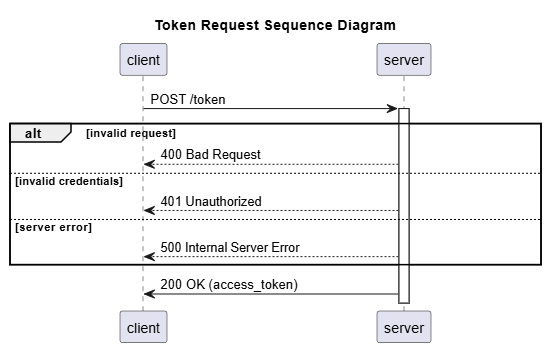
Access is protected using OAuth 2.0. To authenticate, you must obtain a bearer token.
Encode Your Credentials: Combine your
client_idandclient_secretinto the formatclient_id:client_secretand Base64-encode the string.Request a Token: Make a
POSTrequest to the/auth/tokenendpoint with the following:- Header:
Authorization: Basic <your_base64_encoded_credentials> - Header:
Content-Type: application/x-www-form-urlencoded - Body:
grant_type=client_credentials
- Header:
Use the Token: The server will respond with a JSON object containing an
access_token. Include this token in theAuthorizationheader of all subsequent API requests.- Header:
Authorization: Bearer <your_access_token>
- Header:
/auth/token
Exchanges the client's credentials for an access token using the OAuth 2.0 Client Credentials flow.
Authentication is performed using HTTP Basic Authentication. The client_id serves as the username and the client_secret as the password, which must be sent in the Authorization header.
Examples
POST https://api.qredi.eu/v1/auth/token
Content-Type: application/x-www-form-urlencoded
Authorization: Basic BASE64(client_id:client_secret)

grant_type=client_credentials
Authorizations:
Request Body schema: application/x-www-form-urlencodedrequired
| grant_type required | string The grant type must be |
Responses
Response samples
- 200
- 400
- 401
{- "access_token": "eyJhbGciOi...",
- "expires_in": 300,
- "token_type": "Bearer",
- "refresh_token": "eyJhbGciOi...",
- "refresh_expires_in": 1800,
- "scope": "profile email"
}The Transport Units endpoints provide a standardized way for external systems to manage logistics records within QREDI.
A transport unit represents a physical or logical grouping of goods, typically identified by a unique logistics identifier such as an SSCC (Serial Shipping Container Code). These endpoints are designed to support common operational workflows where transport units need to be registered, updated, or removed as part of the supply chain process.
POST - allows external systems to create new transport units in QREDI. This is typically used to register shipments or pallets at the point of preparation or dispatch.
PUT - enables the modification of existing transport units identified by their external identifier. This operation is used when certain details, such as location or order references, need to be updated during the reserving phase of the logistics process.
DELETE - provides a way to remove transport units from the system when they are no longer needed or were created in error. Deletions are restricted to units in eligible states to ensure data consistency.
When creating a transport unit, you can provide details such as external identifier of physical barcode (in cases where QREDI identifier is not available), sales order ID, and the location where the transport unit is placed. The location must include a postal address with specific fields like street address, locality, country, and postal code.
The API will validate the provided information and return a response indicating the success or failure of the operation. If successful, it will return the details of the created transport unit.
Together, these operations help maintain accurate, real-time visibility of goods movement and support efficient integration between QREDI and partner systems.
/external/transport-units
Creates one or more transport units in QREDI based on data from an external system. This endpoint is designed for batch processing.
Best Practices:
- Provide a stable
externalIdfor each unit to simplify deduplication and tracking across systems. - Batch related units in a single request to improve efficiency.
Example
POST https://api.qredi.eu/v1/external/transport-units
Content-Type: application/json

[json payload]
Authorizations:
Request Body schema: application/jsonrequired
An array of transport units to be created. At least one item must be provided.
| externalId | string The identifier for the transport unit in the source external system. |
| salesOrderId | string The sales order ID associated with the transport unit. |
required | object The physical location information for the transport unit. |
Responses
Request samples
- Payload
[- {
- "externalId": "EXT-54321",
- "salesOrderId": "SO-11223",
- "place": {
- "address": {
- "streetAddress": "Main St 123",
- "locality": "Kaunas",
- "country": "LT",
- "postalCode": "44250"
}
}
}, - {
- "externalId": "EXT-54322",
- "place": {
- "address": {
- "streetAddress": "Oak Ave 456",
- "locality": "Vilnius",
- "country": "LT",
- "postalCode": "01100"
}
}
}
]Response samples
- 201
- 400
- 401
- 403
- 409
- 500
[- {
- "id": "12345",
- "carrierUnitNumber": "SO-11223",
- "salesOrderId": "SO-11223",
- "sellerLocationDescription": "",
- "state": "RESERVED",
- "businessStep": "receiving",
- "eventTime": "2025-07-23T09:38:43Z",
}, - {
- "id": "12346",
- "carrierUnitNumber": "EXT-54322",
- "salesOrderId": "EXT-54322",
- "sellerLocationDescription": "",
- "state": "RESERVED",
- "businessStep": "receiving",
- "eventTime": "2025-07-23T09:39:05Z",
}
]/external/transport-units/{sscc}
Updates transport unit in QREDI based on data from an external system.
The data modification can be done in RESERVING status.
Example
PUT https://api.qredi.eu/v1/external/transport-units/195200070000004132
Content-Type: application/json

[json payload]
Authorizations:
path Parameters
| sscc required | string SSCC (Serial Shipping Container Code) of the transport unit to update. |
Request Body schema: application/jsonrequired
Transport unit to be updated. Body cannot be empty.
| externalId | string The identifier for the transport unit in the source external system. |
| salesOrderId | string The sales order ID associated with the transport unit. |
required | object The physical location information for the transport unit. |
Responses
Request samples
- Payload
{- "externalId": "EXT-54321",
- "salesOrderId": "SO-11223",
- "place": {
- "address": {
- "streetAddress": "Main St 123",
- "locality": "Vilnius",
- "country": "LT",
- "postalCode": "54321"
}
}
}Response samples
- 200
- 400
- 401
- 403
- 404
- 405
- 500
{- "id": "12345",
- "carrierUnitNumber": "SO-11223",
- "salesOrderId": "SO-11223",
- "sellerLocationDescription": "",
- "state": "RESERVED",
- "businessStep": "receiving",
- "eventTime": "2025-07-23T09:38:43Z",
}/external/transport-units/{sscc}
Deletes transport unit in QREDI based on data from an external system.
The data deletion can be done in RESERVING status.
Example
DELETE https://api.qredi.eu/v1/external/transport-units/195200070000004132
Authorizations:
path Parameters
| sscc required | string SSCC (Serial Shipping Container Code) of the transport unit to delete. |
Responses
Response samples
- 400
- 401
- 403
- 404
- 405
- 500
{- "body": "Invalid parameter"
}Once authenticated, you can retrieve event data from the EPCIS endpoints.
Filtering
Refine your search using query parameters. Common filters include:
- Time:
GE_eventTime,LE_eventTime,GE_recordTime,LE_recordTime - Business Context:
EQ_bizStep,EQ_disposition,EQ_action - Location:
EQ_bizLocation
Sorting
Control the order of results using orderBy (eventTime or recordTime) and orderDirection (asc or desc).
Pagination
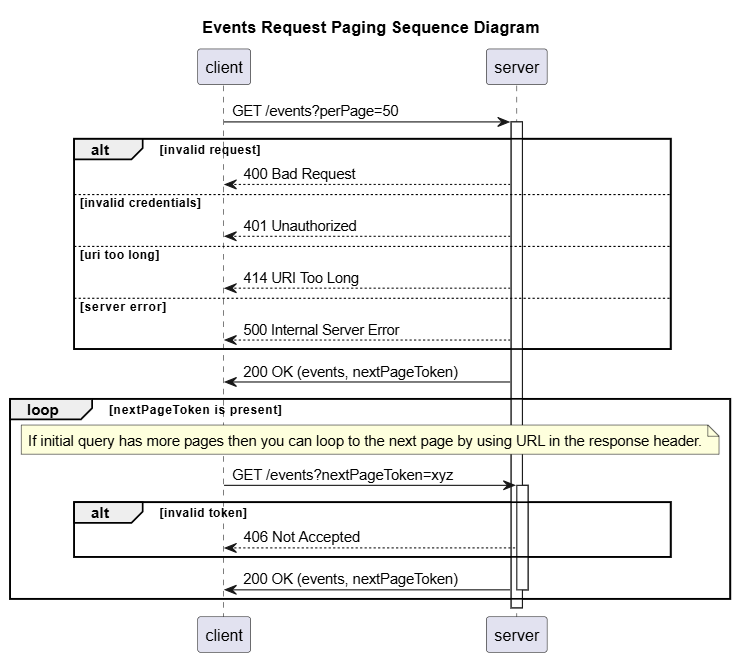
The API uses a token-based, Link header strategy for pagination.
- Set the number of results per page with the
perPageparameter. - If more results exist, the response will include a
Linkheader containing a URL withrel="next". - To retrieve the next page, make a
GETrequest to this "next" URL. - Continue this process until a response is returned without a
Linkheader whererel="next".
/epcs/{epc}/events
Retrieves a paginated list of EPCIS events associated with a specific Electronic Product Code (EPC).
The EPC provided in the path must be a URL-encoded GS1 Digital Link URI.
Results are returned as an EPCISDocument page, with events located in the epcisBody.eventList. This endpoint uses a cursor-based pagination model via the Link response header and the nextPageToken parameter.
Best Practices:
- Always use URL-encoded Digital Link URIs for EPCs in the path.
- Apply time and attribute filters (e.g.,
GE_eventTime,EQ_bizStep) to limit the result set size and improve performance. - Keep the
perPagevalue reasonable (e.g., 100 or less).
Examples
GET https://api.qredi.eu/v1/epcis/epcs/https%3A%2F%2Fid.qredi.eu%2F00%2F195200070000001766/events?perPage=100
GET https://api.qredi.eu/v1/epcis/epcs/https%3A%2F%2Fid.qredi.eu%2F00%2F195200070000001766/events?perPage=100&EQ_bizStep=RECEIVING
Authorizations:
path Parameters
| epc required | string <uri> Example: https%3A%2F%2Fid.qredi.eu%2F00%2F195200070000001766 The URL-encoded GS1 Digital Link URI for the Electronic Product Code (e.g., an SSCC). |
query Parameters
| EQ_action | string Enum: "ADD" "OBSERVE" "DELETE" If specified, the result will only include events that have an action field; and where the value of the action field matches one of the specified values. If omitted, events are included regardless of their action field. |
| GE_eventTime | string <date-time> If specified, only events with eventTime greater than or equal (≥) to the specified value will be included in the result. If omitted, events are included regardless of their eventTime (unless constrained by the LT_eventTime parameter). |
| LE_eventTime | string <date-time> If specified, only events with eventTime less than (≤) the specified value will be included in the result. If omitted, events are included regardless of their eventTime (unless constrained by the GE_eventTime parameter). |
| GE_recordTime | string <date-time> If provided, only events with recordTime greater than or equal (≥) to the specified value will be returned. If omitted, events are included regardless of their recordTime, other than automatic limitation based on event record time. |
| LE_recordTime | string <date-time> If provided, only events with recordTime less than (≤) the specified value will be returned. If omitted, events are included regardless of their recordTime (unless constrained by the GE_recordTime parameter or the automatic limitation based on event record time). |
| EQ_bizLocation | string <uri> If specified, the result will only include events that have a non-null bizLocation field; and where the value of the bizLocation field matches one of the specified URIs. If this parameter is omitted, events are returned regardless of the value of the bizLocation field or whether the bizLocation field exists at all. |
| EQ_bizStep | string Enum: "reserving" "departing" "arriving" "void_shipping" "receiving" If specified, the result will only include events that have a non-null bizStep field; and where the value of the bizStep field matches one of the specified values. If this parameter is omitted, events are returned regardless of the value of the bizStep field or whether the bizStep field exists at all. Different values can be combined using | (pipe) character. |
| EQ_disposition | string Enum: "damaged" "returned" If specified, the result will only include events that have a non-null disposition field; and where the value of the disposition field matches one of the specified values. If this parameter is omitted, events are returned regardless of the value of the disposition field or whether the disposition field exists at all. |
| orderBy | string Default: "eventTime" Enum: "eventTime" "recordTime" If specified, names a single field that will be used to order the results. If omitted, no order is specified. The implementation MAY order the results in any order it chooses, and that order MAY differ even when the same query is executed twice on the same data. |
| orderDirection | string Default: "desc" Enum: "asc" "desc" If specified and orderBy is also specified, specifies whether the results are ordered in ascending or descending sequence according to the key specified by orderBy. |
| perPage | integer [ 1 .. 1000 ] Default: 30 Parameter to control pagination. perPage specifies the maximum number of events returned in one batch. |
| nextPageToken | string Example: nextPageToken=190d285f-7fae-42a6-98d4-9a0dae76bad0 Parameter to control pagination. nextPageToken specifies the link to events for next batch. |
header Parameters
| Accept required | string Default: application/json |
| GS1-EPCIS-Min required | string Default: 2.0.0 The lowest EPCIS version supported. |
| GS1-EPCIS-Max required | string Default: 2.0.0 The highest EPCIS version supported. |
| GS1-CBV-Min required | string Default: 2.0.0 The lowest Core Business Vocabulary (CBV) version supported. |
| GS1-CBV-Max required | string Default: 2.0.0 The highest Core Business Vocabulary (CBV) version supported. |
Responses
Response samples
- 200
- 400
- 401
- 403
- 406
- 414
- 500
{- "type": "EPCISDocument",
- "schemaVersion": "2.0",
- "creationDate": "2025-06-26T11:00:01.0Z",
- "epcisBody": {
- "eventList": [
- {
- "type": "ObjectEvent",
- "eventTime": "2025-06-26T11:00:00Z",
- "recordTime": "2025-06-26T11:00:00Z",
- "eventTimeZoneOffset": "+03:00",
- "eventID": "urn:uuid:93e70378-ba6d-4192-b15e-b6889f611f57",
- "action": "ADD",
- "bizStep": "receiving",
}
]
}
}| Version | Changes |
|---|---|
| 1.1.2 | Updated parameter name to sscc for PUT and DELETE methods in /external/transport-units request. |
| 1.1.1 | Updated response code from 200 to 201 for successful POST /external/transport-units request. |
| 1.1.0 | Added PUT and DELETE endpoints for /external/transport-units. |
| 1.0.0 | Initial release of the QREDI Integration API. |